
Hướng dẫn cách làm như sau, bạn chèn đoạn mã bên dưới vào themes/tentheme/functions.php
// congminh
add_filter( 'manage_edit-shop_order_columns', 'custom_shop_order_column', 20 );
function custom_shop_order_column($columns)
{
    $reordered_columns = array();
    foreach( $columns as $key => $column){
        $reordered_columns[$key] = $column;
        if( $key ==  'order_status' ){
   			$reordered_columns['column-thumb'] = __( 'Images', 'woocommerce');
   			$reordered_columns['column-product'] = __( 'Products', 'woocommerce');
   			$reordered_columns['column-phone'] = __( 'Phone', 'woocommerce');
        }
    }
    return $reordered_columns;
}

add_action( 'manage_shop_order_posts_custom_column' , 'custom_orders_list_column_content', 20, 2 );
function custom_orders_list_column_content( $column, $post_id )
{
global $post, $woocommerce, $item_id;
$order = wc_get_order( $post->ID );
switch ( $column ) {
	case 'column-thumb' :
	foreach ( $order->get_items() as $key => $item ) {
		$data = wc_get_order_item_meta( $key, '_product_id' );
		$product = wc_get_product( $data );
		echo '<p><a href="'.esc_url( get_permalink($data) ).'" target="_blank">'.$product->get_image().'</a></p>';
	}
    break;
	case 'column-product' :
	foreach ( $order->get_items() as $key => $item ) {
			$data = wc_get_order_item_meta( $key, '_product_id' );
		echo '<p><a href="'.esc_url( get_permalink($data) ).'" target="_blank">'. $item['quantity'] .' x '.esc_attr( get_the_title( $data ) ).'</a></p>';
	}
    break;
	case 'column-phone' :
	$my_var_one = get_post_meta( $post_id, '_billing_phone', true );
		if(!empty($my_var_one))
			echo $my_var_one;
		else
			echo '<small>(<em>No</em>)</small>';
		break;
}
}
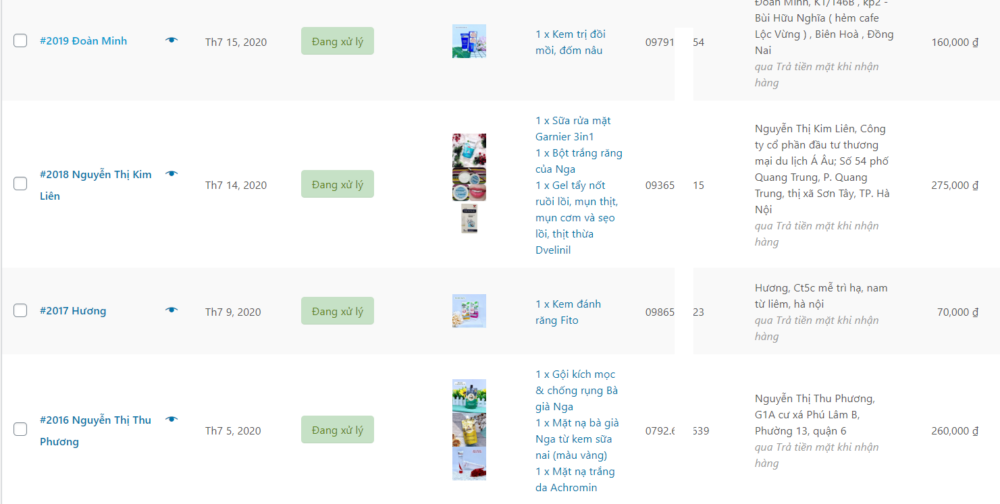
Sau khi chèn xong bạn vào trang quản lý đơn hàng sẽ có kết quả chi tiết như ảnh.

Nguồn:#wpvnteam COP